Use any AI.
Leave the names behind.
You shouldn't have to trust an AI company with sensitive data. De‑ID takes identifiable information such as names, numbers and faces out on your own computer, so Claude, ChatGPT, Gemini or Copilot get the version without them, then puts the names back in the answer, on your screen.
Alpha 0.8.4, an early version that may change from one release to the next. No account, and De‑ID itself sends nothing anywhere. macOS 14 or later, Windows 10 and 11, Ubuntu, Debian, Fedora and RHEL.
- Copied
- Names out
- AI reads
- AI answers
- Names back
Summarise Jordan Halvorsen's appeal and draft a reply to jhalvorsen@example.edu.
Summarise <PERSON_5c62dc>'s appeal and draft a reply to <EMAIL_ADDRESS_8ee893>.
Dear <PERSON_5c62dc>, thank you for writing to the Committee. We've read your appeal and the note from your advisor…
Dear Jordan Halvorsen, thank you for writing to the Committee. We've read your appeal and the note from your advisor…
Between you and any AI.
With De‑ID, what reaches your AI is the version of your data without identifiable information about people, and the link back to them never leaves your computer.
- ChatGPT
- Claude
- Gemini
- Copilot
- Claude Code
- Codex
- Antigravity
- OpenCode
- Claude Desktop
- any chat or command you add
Copy twice, in any chat
Select text anywhere, hold ⌘ (Ctrl on Windows) and press C twice. The clipboard now holds it with names, emails, phone numbers and IDs swapped for tokens: paste it into ChatGPT, Claude, Gemini or any chat. The same person keeps the same token all conversation, so the AI can follow along. Copy its answer the same way to see the names back.
On Linux, both are in the tray menu.
Help me reply to Dr. Celeste Moraine
Help me reply to Dr. <PERSON_8eba40>
about Ingrid Halvorsen's hospital stay.
about <PERSON_26c760>'s hospital stay.
Her number is (555) 555-0187.
Her number is <PHONE_NUMBER_4d91e2>.
A made-up example. Tokens like these are what the AI company receives.
The AI workspace, for command-line tools
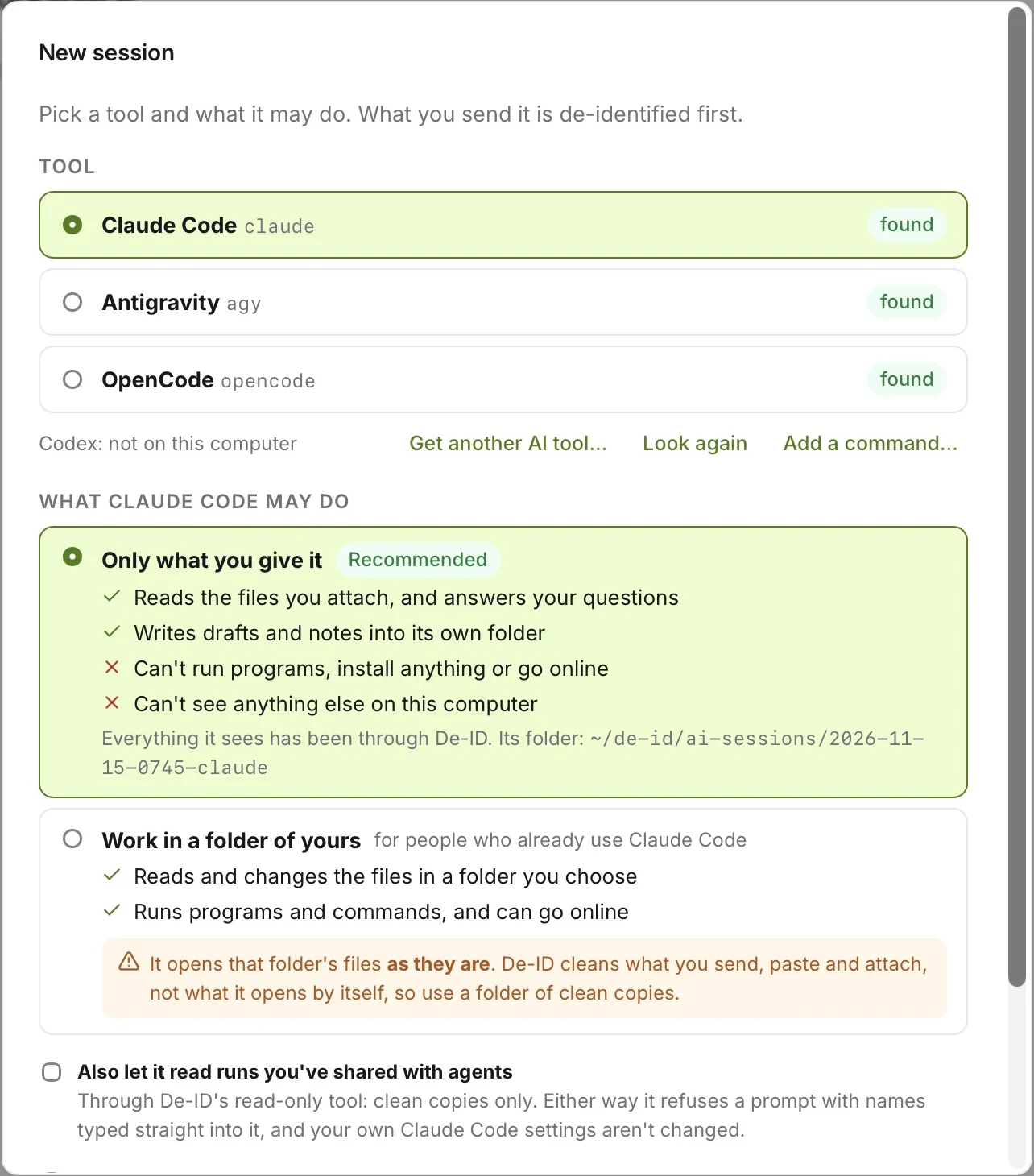
Run Claude Code, Codex, Antigravity, OpenCode and others inside De‑ID. What you type, paste or attach is de‑identified before the tool sees it, and each session says in plain words what its AI may do. By default Claude Code gets only what you give it: no programs, no web, and nothing else on this computer.
Agents read clean copies, and every read is logged
Claude Code, Claude Desktop and Copilot in VS Code can list, read and search the runs you choose to share, through De‑ID's read-only tool. They never see an original, an original file name or a folder path, and they can't ask for a name back.
| An agent can | An agent can't |
|---|---|
| List the files you shared | See a run you didn't share |
| Read one, a page range at a time | See an original, its name or its folder |
| Search their text | Get a name back |
AI tools make their own connections, as they always would; what they get from De‑ID is the version without the names. Product names belong to their owners, and De‑ID isn't affiliated with or endorsed by them.
Every file is about someone.
Drop in a folder of PDFs, scans, Word files, spreadsheets, text or photos. De‑ID reads each one on this computer, takes out what identifies a person, and saves a clean copy beside the original. It has no account, no cloud and no connection of its own.
Stays on this computer
- Your originals, untouched, where they already are.
- The crosswalk: which token stands for which person. It's as sensitive as the originals, so keep the disk encrypted.
- Who a token means. Point at one in De‑ID and it tells you, on your screen only.
Leaves, only if you send it
- A clean copy: a redacted PDF, Markdown, CSV or text, with each person replaced by a label or the same token every time.
- Nothing under the black boxes. Redacted text is deleted, not covered, so copying or searching finds nothing there. Hidden PDF data and photo metadata go too.
- No faces or signatures. They're blacked out, and every photo is flagged for a person to look at.

Read twice before it's saved
Every clean copy is read again from scratch. If anything that looks like an identifier is still there, the file isn't saved. A name found once in a file is removed everywhere in it, and scanned pages are read again at a higher resolution.
No tool catches everything. So a person checks, and it's scored.
On a made-up folder of six student documents, De‑ID removed 123 identifiers in four seconds and held one scanned page for a person to look at. Then a spot check drew three pages at random, and the auditor found two things it had missed: a student ID, and an advisor's initial and surname. One click turns both into fixes for the whole run.


We'd rather show you 97% than claim 100%. Run it on your own work, and tell us what it misses.
It never says “compliant.”
Choose FERPA, HIPAA Safe Harbor or the HIPAA Limited Data Set, and the settings that standard needs are switched on and locked for the run. Each one ends in a person's judgement, so the run report says which settings were on and what's still to check. A limited data set isn't de-identified at all, and goes out only under a data use agreement. The judgement stays yours.
De‑ID is for researchers, clinicians and financial professionals who want AI's help with work about other people; for records offices that need clean copies to share; and for anyone who has paused before pasting an email or a case note into a chat.
A quick note:
I'm Hants Williams, and I make De‑ID. I come from academic research and healthcare.
De‑ID is still in alpha, so the most helpful thing you can do is try it: put it on one machine and point it at a folder of copies.
Let me know how it went, what it missed, what got in your way, or what you'd need to make it work for you. Questions and concerns are welcome.
Hants
Try it on your own work.
Start with copies, or with made-up documents, before real records. Everything De‑ID needs is in the download, and the first launch takes up to a minute. It's $29.99, once, with updates included.
For a team or organization For your security review Release notes for 0.8.4